Building a Virtual World Worthy of Sci-Fi
Build Out Episode #2: Designing a global metaverse

In the second episode of Build Out, Colt McAnlis and Reto Meier were given the challenge of designing a global metaverse.
TL;DW: What they designed
Both solutions describe a design to generate a 3D environment that users experience using a virtual reality headset, using various levels of cloud compute and storage to provide virtual Earth data to the client, and calculate changes to the world environment as users interact with it.
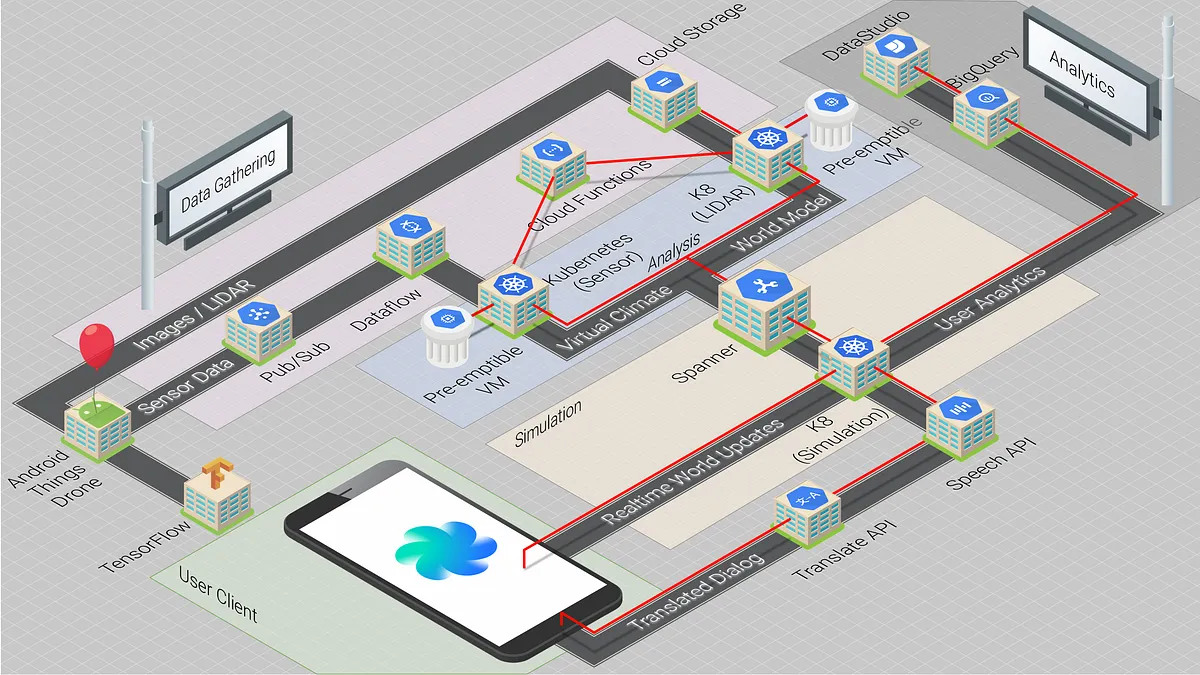
Reto’s solution
Focuses on creating a virtual clone of the real world using millions of drones to obtain real-time sensor readings. His virtual space is intrinsically linked to the real-world, including everything from geometry to prevailing weather conditions.
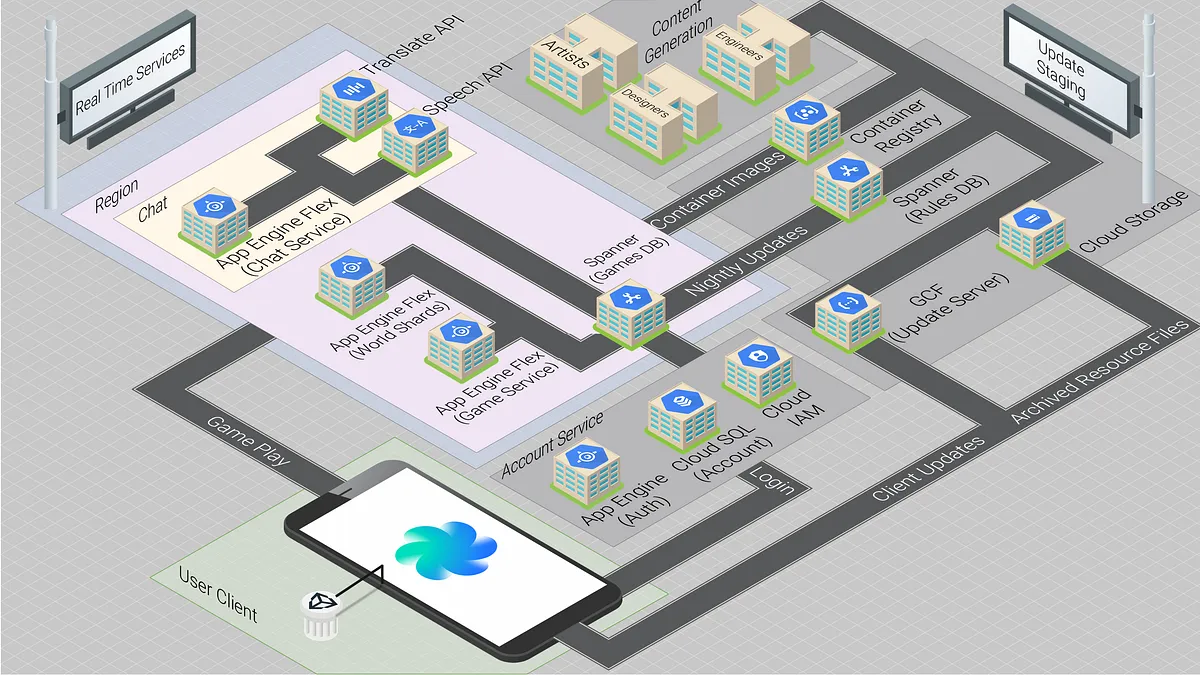
Colt’s solution
Leverages his video game development experience with a system design that completely disconnects the virtual world from the physical world. His architecture details the required framework for building the back-end services for an MMO (or other large scale cooperative space.)
Building your own global metaverse
The biggest difference in these designs is the source of the virtual environments’ climate and geometry. Reto’s design relies on analyzing the results of sensors in the real-world, where Colt’s system uses artists to contribute artificial landscapes and buildings. For this write-up, we’re going to build a hybrid of both.
We’ll start by generating our world geometry using Reto’s data-driven, real-world approach. Later, we’ll wire up Colt’s MMO back-end to bring that world to life with player interactions.
To achieve the original real-world-based geometry and texture generation, we can look to Google Maps as inspiration. The Google Maps system uses a combination of imagery and sensor data to generate 3D models along with texture information. This allows them to generate very realistic 3D representations of urban environments.
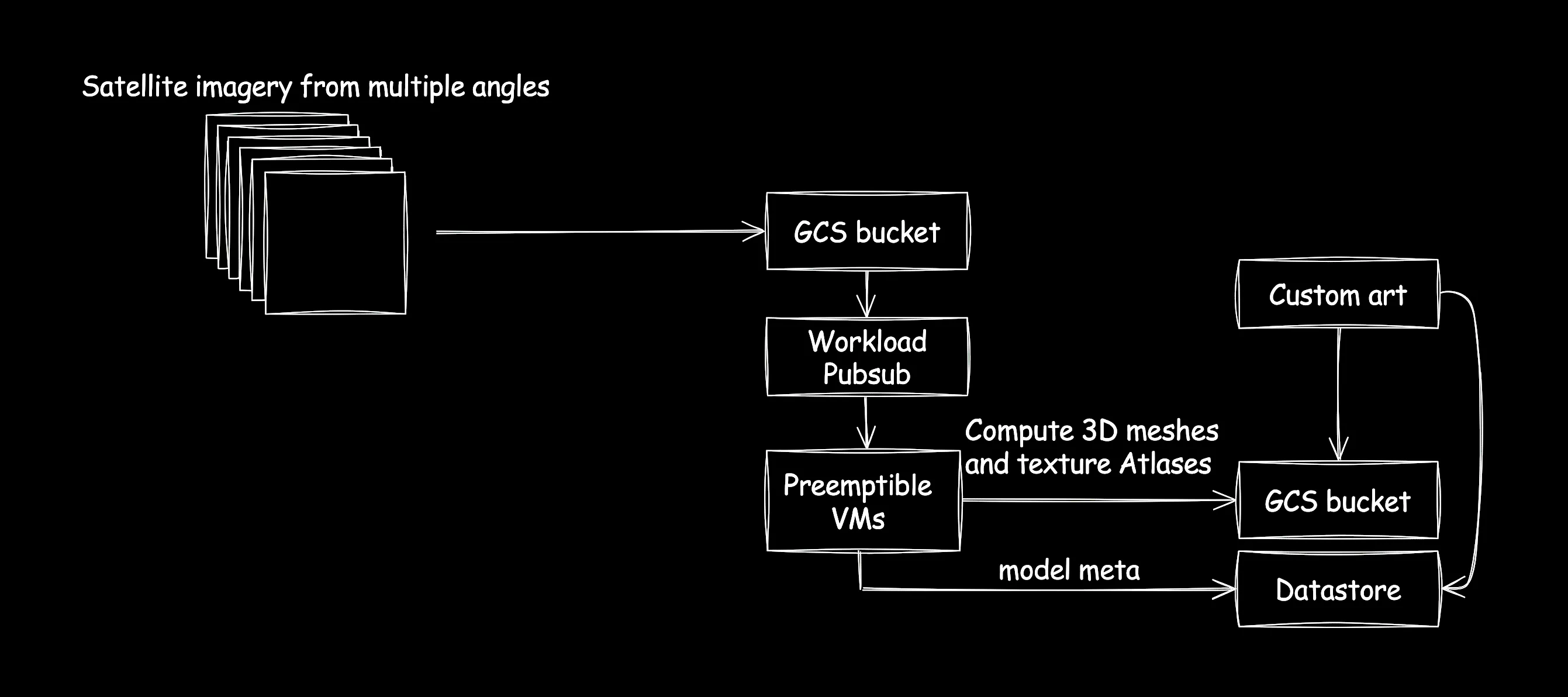
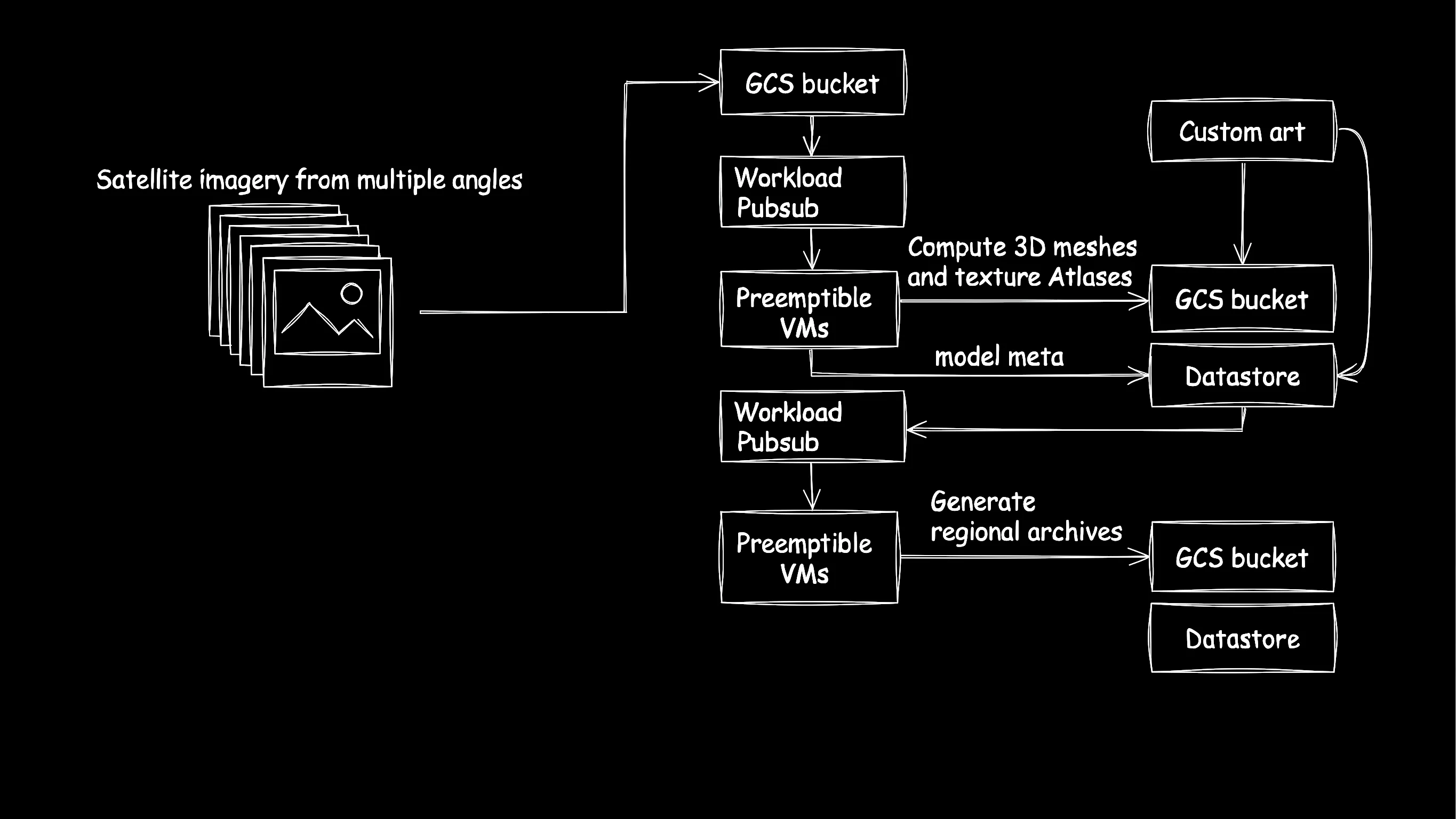
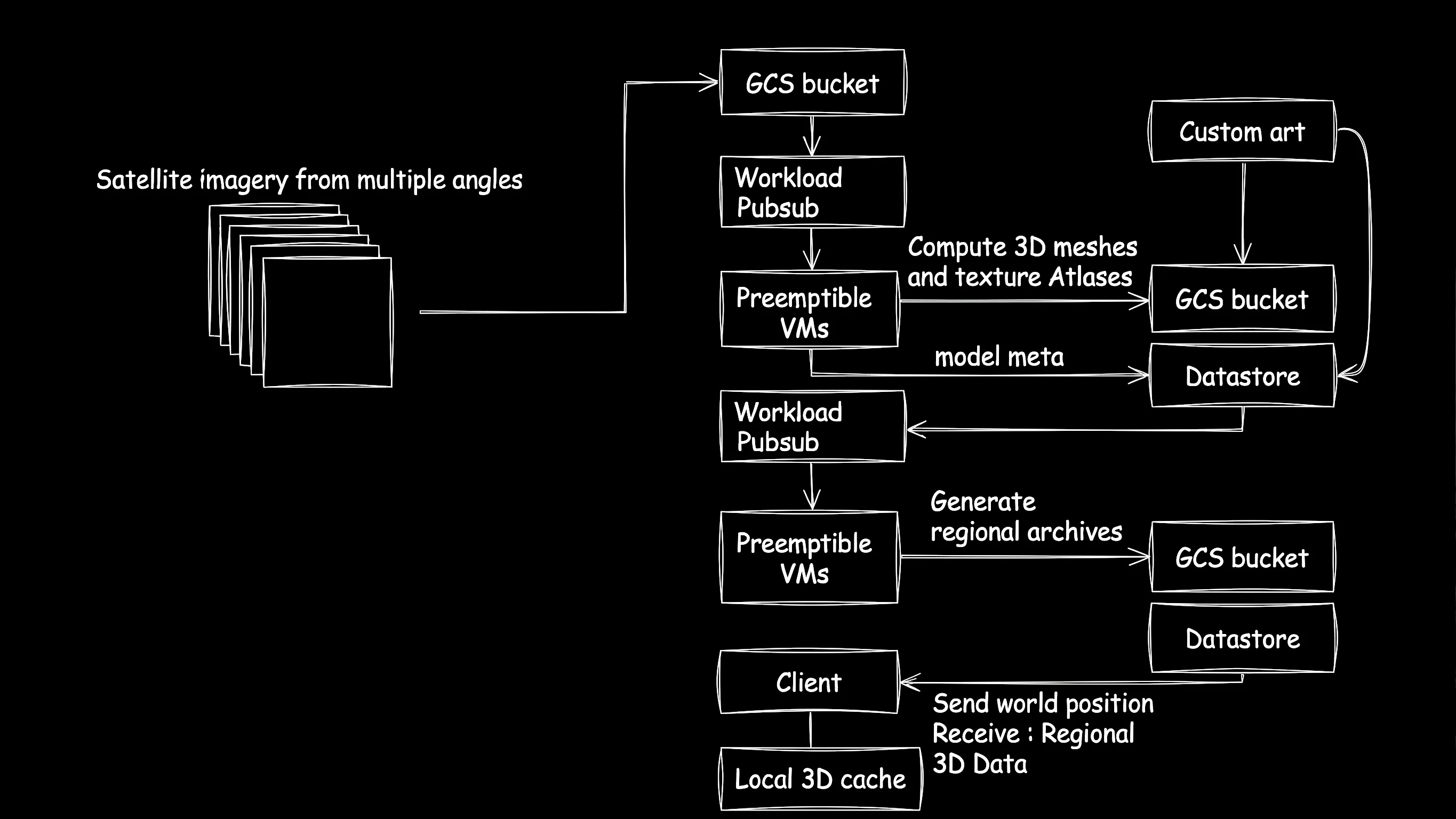
Mirroring this process lets us generate a very similar representation for our metaverse. We can use satellite data, LIDAR input, and drone photography from various angles and sources, and push that into a GCS bucket. Then we generate and initiate work requests using pub/sub. A fleet of preemptable VMs gather those pub/sub requests and start doing 3D meshing and texture atlas generation, pushing final results into a GCS bucket.
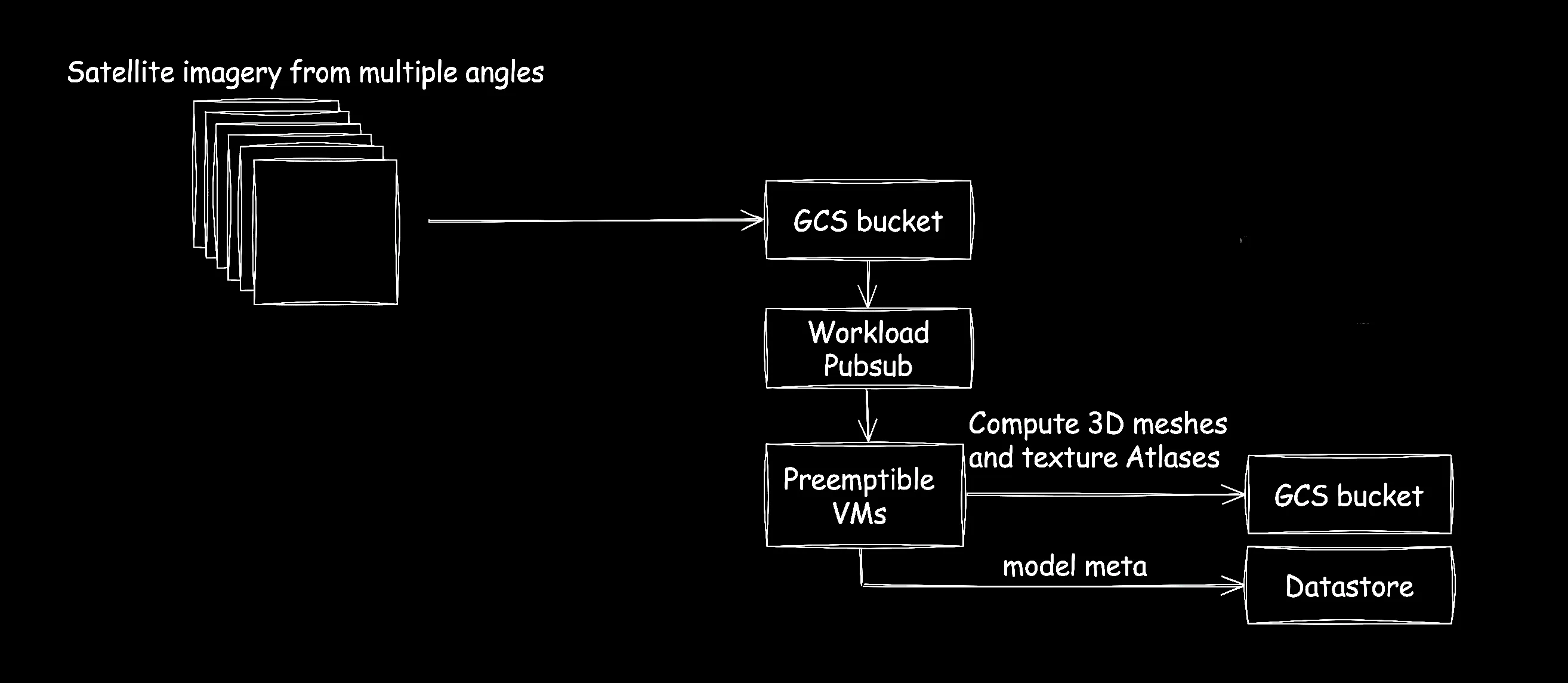
Why pre-emptable VMs? PVMs allow themselves to be terminated by the Compute Engine manager. As such they offer a significantly discounted price than standard VMs of the same configuration. Since their lifespans are volatile, they are perfect for batch work jobs where work may get interrupted and not completed. (2026 Note: Spot VMs are the latest version of preemptible VMs, and provide new features that preemptible VMs don’t support.)
Pub/sub works hand-in-hand with PVMs in this regard. Once a PVM receives a termination signal, it can stop work, and push the workload back to pub/sub for another PVM to pick up and work on later.
Here we can incorporate concepts from Colt’s proposal. For areas where this algorithm fails, we can allow users to submit custom models and textures for iconic landmarks, which can be inserted into the generated 3D environment.
Storing and distributing metaverse binary data
Once all of our mesh and texture data has been processed, the result will be literal terabytes of virtual environment environmental data. Obviously, we can’t stream all that to each client at once, so instead, we bundle up model data based on geographic boundaries.
These “regional blobs” are indexed, contain metadata, and can be stored in multi-layered compressed archives so that they can be streamed to the client.
To compute this, we can use the same offline build-process as for 3D mesh generation; specifically we can generate a bunch of tasks for pub/sub, and use an army of preemptible VMs to compute and combine the proper regional blob archives.
Distribution of the regional archives to the client depends on the user’s “physical” location in the virtual universe—as well as what direction they’re facing.
In order to optimize load times for the client, we add a local cache for areas they visit frequently to keep them from having to download gigs of data every time they enter a new area.
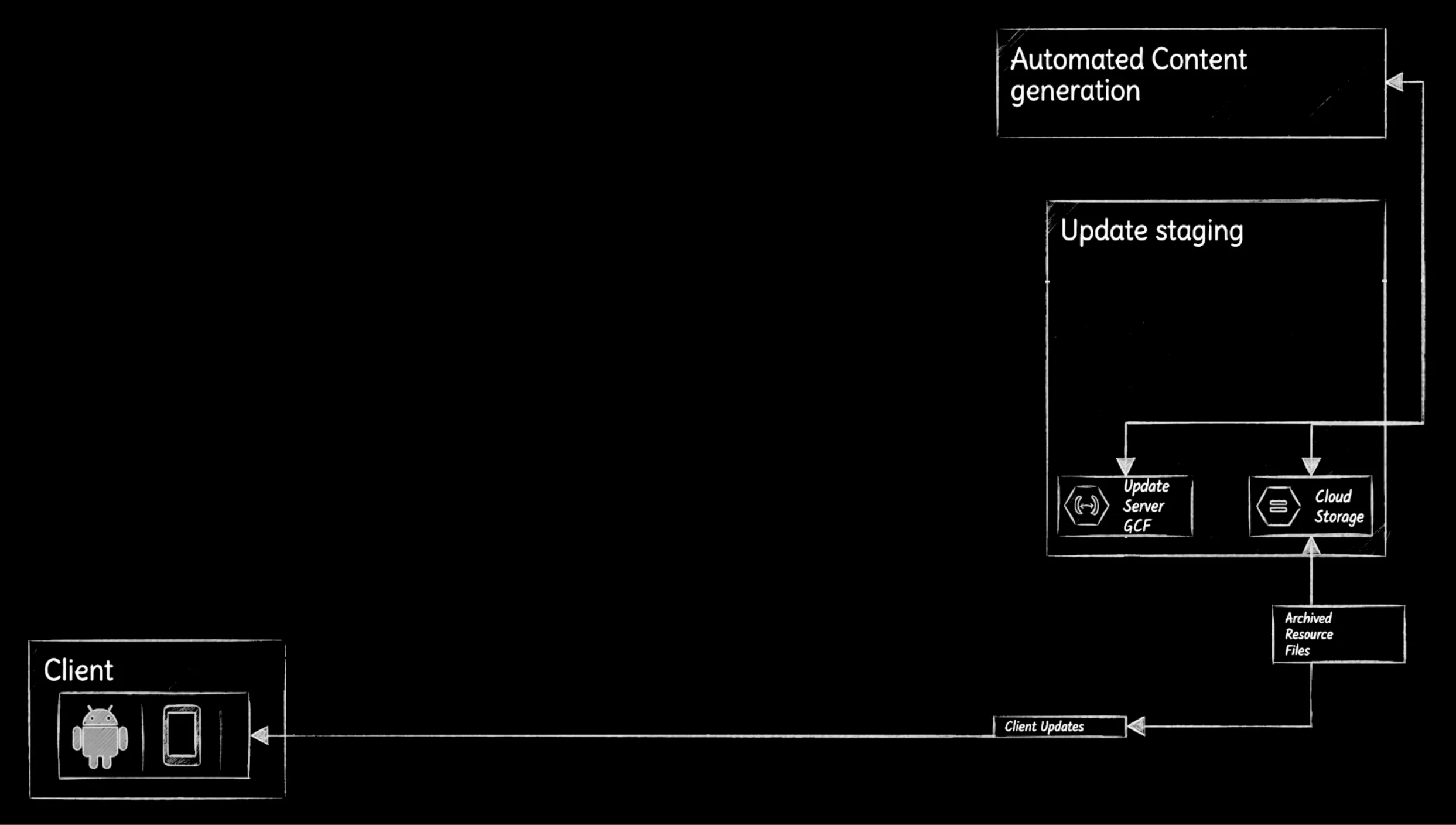
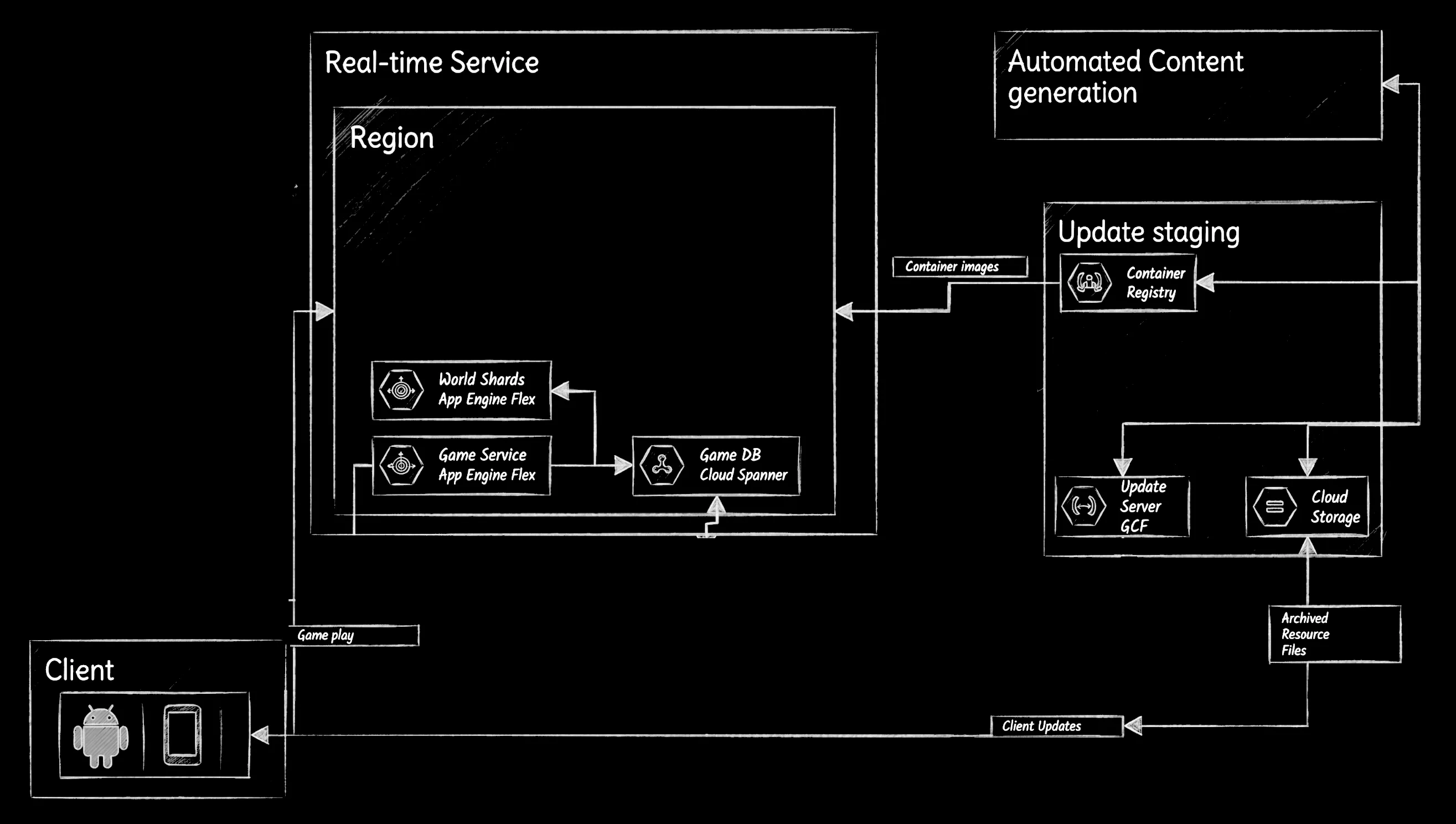
For the sake of diagram clarity, we can wrap this entire process up as an offline system, and call it “Automated Content Generation” (ACG).
Over time, the local cache will become invalid, or updates will need to be pushed out to the user. For this, we put together an update & staging process, where a client can receive the updated environment data as they log-in, or as they re-enter a zone they have recently visited.
Bringing the world to life
Up to this point, we’ve focused on generating a highly realistic, static 3D environment using the data-driven mapping approach from Reto’s architecture. We have our geometry, our textures, and a way to distribute those massive regional blobs to the client. However, a true metaverse is more than just a beautifully rendered ghost town—it requires real-time interaction, player movement, and shared experiences.
To handle the dynamic, multi-player aspects of our virtual world, we need to shift gears and integrate the MMO backend services detailed in Colt’s architecture. By taking the realistic, sensor-driven environment from the first design and plugging it into the robust, scalable simulation framework of the second, we can build a hybrid system that offers the best of both worlds.
Simulation data for your metaverse
As your users move and interact with the virtual environment, any changes they make will need to be synced with the rest of the universe data and shared with other users.
You’ll need some composite components to make sure that user actions aren’t violating any physical rules, and a system for storing or broadcasting this information to the other players.
For this you can leverage a set of App Engine Flex groups, that we’ll call “World Shards” that allow geographically similar clients to connect and exchange data on position and movement information. So as a user enters a game zone, we’ll figure out their closest region, and connect them directly to the appropriate World Shard.
Why App Engine Flex? We could have used an instanced group of GCE VMs, which share an image, however app engine flex gives us that same functionality without needing the extra maintenance overhead.
We’ll also need a separate set of compute instances to help us manage all the secondary world-interaction items. Things like purchasing goods, inter-player communication, and so on. For this you can spin up a second group of App Engine Flex instances.
Any persistent data that needs to be distributed to other clients will be stored in Spanner, which will allow regionally similar clients to share information as soon as it happens.
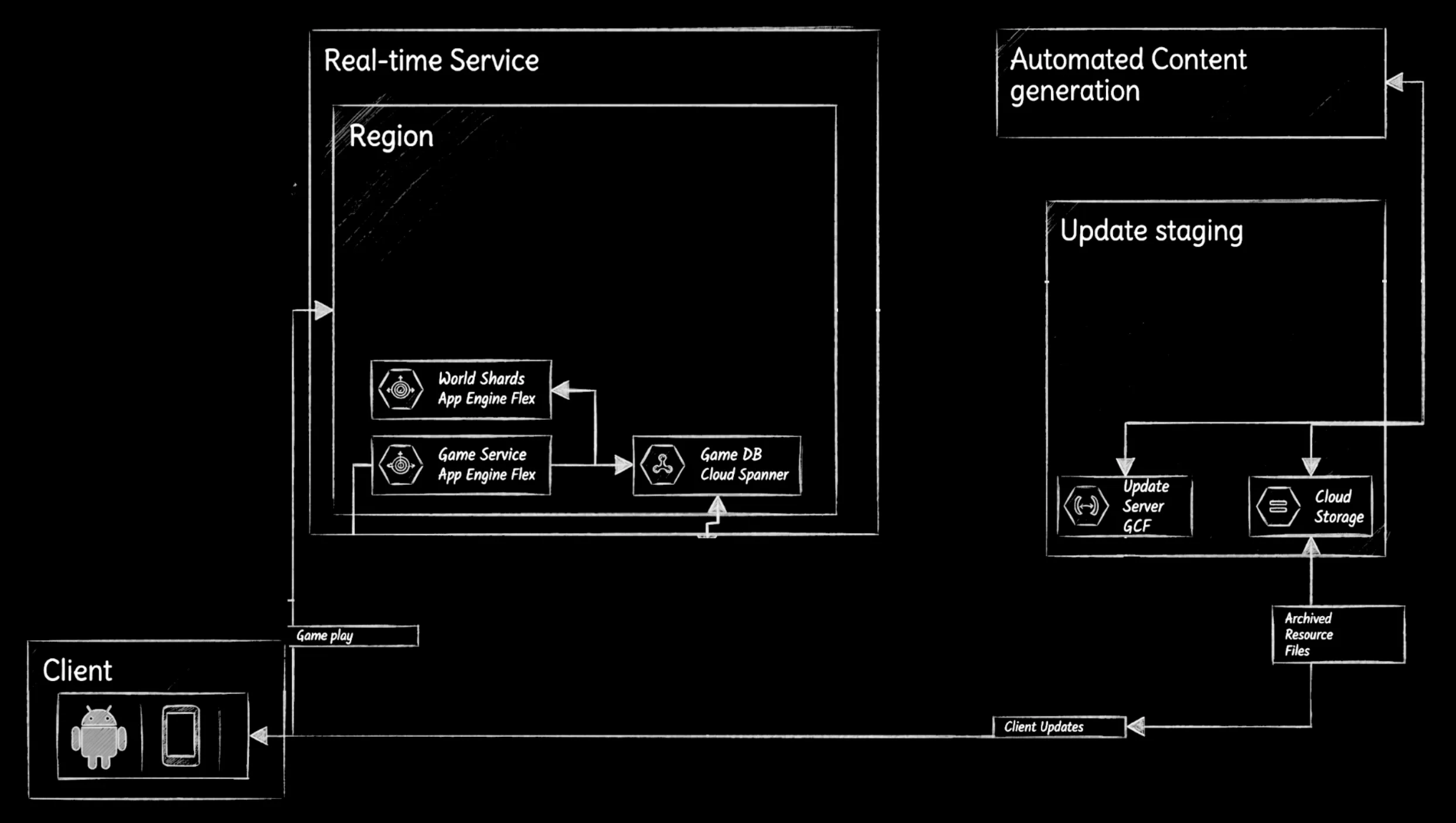
Why Spanner? We chose spanner here due to its managed service, global capacity, and ability to scale to handle very high transactional workloads.
Since our code will change often, we need to augment our updating and staging servers to also distribute code to our world-shards. To do this, we allow compute-level staging to occur in our staging code, and push images to Google Container Registry to be propped out to various world shards and game servers as needed.
Drawing your metaverse
A metaverse isn’t a metaverse unless you have a headset. For this, you can leverage Google VR and the Android Daydream platform to render our massive metaverse within a fully immersive VR experience. (Note: Google VR and Android Daydream were deprecated in 2019. These days you’d want to investigate the Android XR platform.)
However, Daydream by itself is not a proper rendering engine, so you’ll need to leverage something like Unity as a tool to help draw all our models and interact with the Daydream system on our behalf.
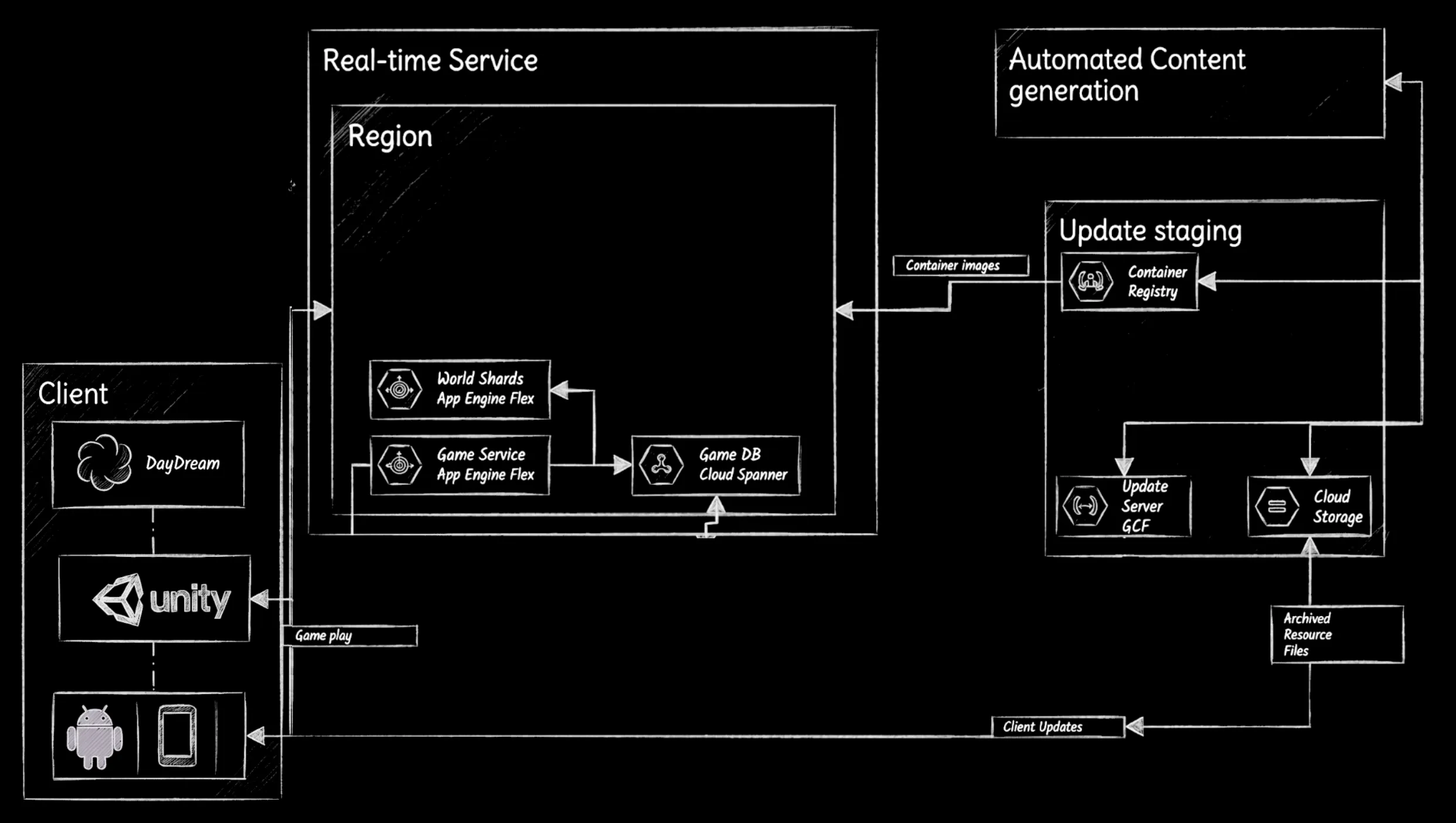
Describing how to properly render millions of polygons per frame in VR mode is a big challenge, but one that’s outside the scope of this article ;)
Account & Identity services
We’re going to add an app engine front-end instance that leverages Cloud IAM to authenticate and identify the user, and communicate with the account management database, which may include sensitive information like billing and contact data.
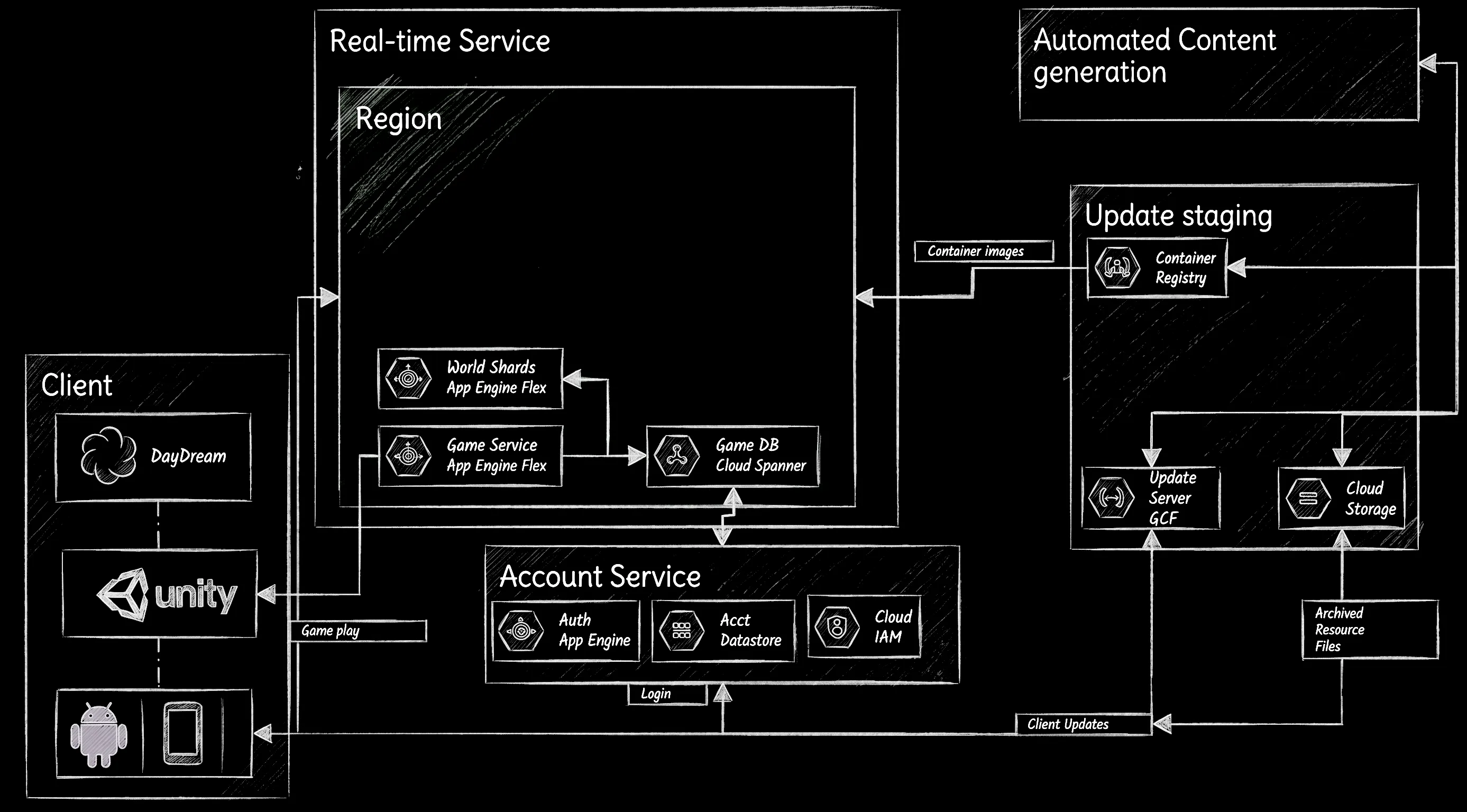
Why App Engine Standard? We chose app engine standard as the front-end service for our IAM system because it’s managed, so we don’t have to deal with provisioning and deployment details like with containers/ GKE/ App Engine Flex. It has built in IAM rules and configurations, so we can write less code and get the right security and login systems we need. And it has direct built in support for datastore, which we use to store all of our IAM data.
The Future of the Virtual Frontier
Ultimately, building a global metaverse isn’t about choosing between a perfect digital twin of our physical reality or an entirely fictional, developer-crafted playground. By blending Reto’s data-driven world generation with Colt’s robust MMO infrastructure, we can engineer a scalable, deeply immersive virtual universe that feels both grounded and infinitely collaborative.
This article was originally published on my Medium page, and has been lightly edited before being republished here.